 RSS Feed
Setup for Dialogs and Scripts
Unreal 2 has dialog and AI scripting systems that are controlled through text files. This tutorial shows you how to prepare a level so that the game knows where it can find those scripts.
Directories
You first need to pick a unique title for your level. This is important : all your scripts must be stored in a directory bearing the same name. You don't want to get mixed up with other levels. If you title your map "CoolLevel" and another level designer also uses this title, the scripts for both levels will be stored in the same directory. The result will be confusing and hard to navigate. A good recommendation is to add your initials or a unique identifier to the end of the name, for example "CoolLevel_mw". Since this is an internal name only (it doesn't have to match the name of the .un2 file or the level-enter text), you can be pretty cryptic.
Create a dialog subdirectory with this name in the Dialog directy of Unreal 2. In this case, it will look something like /Unreal2/Dialog/CoolLevel_mw. All .dlg files you will create for the mission will go inside.
Create the AI scripts subdirectory of the same name in the Scripts directory of Unreal 2. In this case, it should be something like /Unreal2/Scripts/CoolLevel_mw. All .u2s files you will create for the mission will go inside. If you don't specify a .u2s directory, the game will look in the base /Unreal2/Scripts directory which acts as a repository for default scripts. You will want to avoid that.
Level Configuration
To link your level to these subdirectories, open the level properties (View → Level Properties, or F6), open the "LevelInfo" tab and enter the name of the directories in the "MapName" slot.
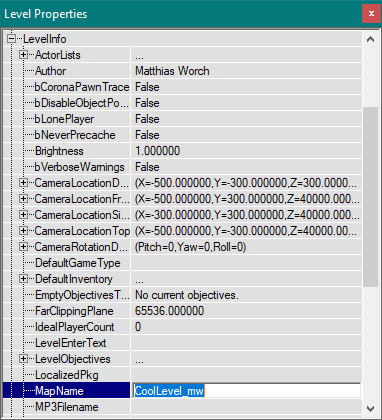
That's it: Unreal 2 will now match the title specified in "MapName" with the directories on the drive. If your project is composed of several small levels, you can share one map name between all the levels and gather all your scripts and dialog in a single directory. If your new mission is large and complex, using a different directory for each map can be easier.